
In the past, I documented the UI frameworks I had considered. It was between pygame-gui and imgui_bundle and at the time, I did not want to spend too much effort building support for imgui_bundle when rendering pygame-gui could be intertwined with my OpenGL approach. However, over time it kept killing FPS fraction at a time which is not surprising given how UI heavy this game was becoming. The pygame-gui framework is great and worth one’s consideration but in the end I decided to go with Dear ImGui via the imgui_bundle Python binding, rendered through ModernGL as the GPU backend. It just felt snappier with many windows and widgets.
Look & Feel
Clock & Speed Controls
Three speeds: Normal, Fast, Fastest. The clock starts on 17 January, 1920, the day Prohibition becomes law in the US.

Controls are fairly intuitive, also controlled with the top 1, 2, and 3 keys.
Bottom menu & Sub menu

For now, I created six menus that are not yet filled in: Orders, Management, Diplomacy, News, City Info, Stats:
Upon clicking Orders, sub menu opens:

Other UIs
At the moment the Top Menu of Lieutenants, Lieutenant Window and other standalone windows are being built.


Architecture
Dear ImGui is a C++ immediate-mode GUI library designed for game engines and tools. So, instead of creating persistent widget objects, you call functions like imgui.Button(“Click”) every frame and it handles layout, input, and rendering on the fly. The imgui_bundle is a Python binding package that wraps Dear ImGui (plus extras like hello_imgui) so you can use it from Python, providing the same immediate-mode API without needing to write C++.
The main challenge was integrating imgui into the game’s rendering pipeline. Below is the core architecture.
- ImguiBackend: translates Pygame events to ImGui, manages ModernGL textures/VAOs/VBOs, handles scissor clipping and ortho projection
- Cython buffer copy – optimized C-level memory copy for extracting ImGui draw data (~60%
perf improvement over pure Python)
- Cython buffer copy – optimized C-level memory copy for extracting ImGui draw data (~60%
- ImguiRenderer: orchestrates all UI components and posts frames to the backend
ImguiBackend
The ImGui backend is basically the glue between Dear ImGui and the game’s actual rendering pipeline. ImGui itself doesn’t know how to draw anything on screen, it just produces vertex/index buffers and draw commands. So the backend takes that draw data and feeds it into ModernGL, setting up the shaders, textures, VAOs, and projection matrices needed to actually render the UI. It also handles translating Pygame’s input events (mouse clicks, key presses, etc.) into a format ImGui understands, since ImGui needs to know about user input but doesn’t talk to Pygame natively.
Flow
Initialization – On startup, it creates an ImGui context, sets up the IO object, and builds the font atlas into a GPU texture via ModernGL. It also prepares blend state (alpha blending) on the ModernGL context.
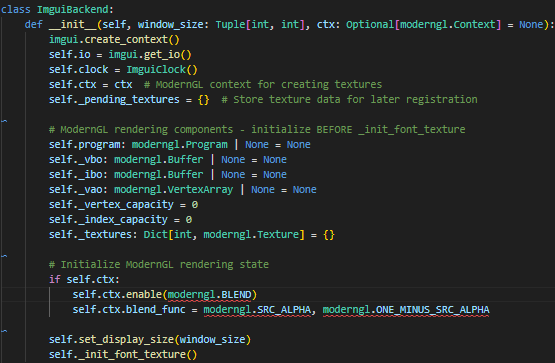
- Input each frame – process_event() receives raw Pygame events (mouse moves, clicks, key presses, text input, scroll wheel) and translates them into ImGui’s input system via calls like io.add_mouse_pos_event() and io.add_key_event(). There’s a key mapping table that converts Pygame key constants to ImGui key constants.

New frame – new_frame() updates the delta time (tracked by a simple perf_counter clock) and the display size, then calls imgui.new_frame() to tell ImGui “okay, start accepting widget calls for this frame.”
Rendering – After all the UI code has run its imgui.* widget calls elsewhere, render() receives the resulting draw data. It loops through each command list, uses a Cython function (extract_imgui_buffers) to quickly pull out vertex and index data while flipping Y coordinates, uploads that data to the GPU via VBO/IBO, then iterates each draw command – setting scissor rects for clipping, binding the right texture, and issuing vao.render() calls. Buffers are dynamically grown (doubled) if they’re too small.

Shutdown – Releases all GPU resources (VAO, VBO, IBO, textures) and destroys the ImGui context to prevent leaks, typically called when switching views or exiting.
So the overall loop each frame is: events in, new frame, UI code runs, render draw data out. This is by far what took the most of the time
ImguiRenderer
The ImguiRenderer is the high-level orchestrator that ties the whole UI together. It owns all the individual UI components: start menu, esc menu, speed controls, bottom menu, lieutenants panel, standalone windows, clock, indicators and initializes them with shared references to the app, backend, and font system. It also pre-loads texture data like establishment cover images so they’re ready on the GPU before anything needs to render.
Each frame, its render() method kicks off the ImGui frame via the backend, pushes the default font, and then decides which UI components to draw based on the current game state. If the player is on the start menu, it renders that. If they’re in gameplay, it renders the full HUD – speed controls, indicators, lieutenant menus, the clock, entity tooltips on hover, etc. If they’re in the esc menu, it just renders that.

Once all the widget calls are done, it calls imgui.render() to finalize the draw data, then hands it off to the backend to actually push the pixels to the screen through ModernGL.
